Technical SEO is the process of optimizing a website’s technical elements so that search engines like Google can easily crawl, index, and rank the website. It focuses on improving the backend structure and performance of a website instead of only the content.
In simple words, Technical SEO helps search engines understand your website better. If your website has technical problems, your pages may not rank even if the content is very good.
Technical SEO is one of the three major parts of SEO:
- On-Page SEO
- Off-Page SEO
- Technical SEO
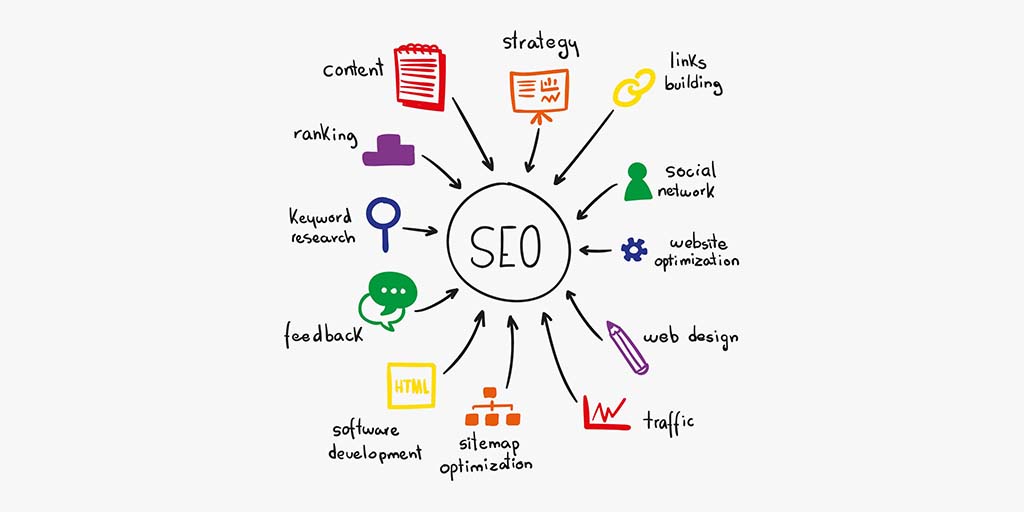
Technical SEO improves website speed, security, mobile friendliness, indexing, crawling, structured data, and overall user experience.
Why Technical SEO is Important
Technical SEO is important because it helps search engines access your website properly. Without technical optimization, search engines may face problems while crawling or indexing pages.
Benefits of Technical SEO
1. Faster Website Speed
A fast website improves user experience and reduces bounce rate.
2. Better Rankings
Search engines prefer technically optimized websites.
3. Mobile-Friendly Experience
Most users browse websites on mobile devices. Technical SEO ensures smooth mobile usage.
4. Better Crawling and Indexing
Search engines can easily understand website pages.
5. Improved Security
HTTPS security protects users and improves trust.
6. Higher User Experience
Visitors stay longer on a fast and smooth website.
Important Elements of Technical SEO
1. Website Crawling
Crawling means search engine bots visit your website pages and collect information.
Search engines use bots like Googlebot to crawl websites.
If crawling is blocked, search engines cannot read your content.
How to Improve Crawling
- Create XML sitemap
- Fix broken links
- Use internal linking
- Remove duplicate pages
- Optimize robots.txt file
2. Website Indexing
Indexing means storing website pages in the search engine database.
If a page is indexed, it can appear in search results.
How to Check Indexing
You can search on Google:
site:yourwebsite.comThis shows indexed pages.
Indexing Problems
- Noindex tags
- Blocked pages
- Duplicate content
- Poor website structure
3. XML Sitemap
An XML sitemap is a file that contains all important URLs of your website.
It helps search engines discover pages quickly.
Benefits of XML Sitemap
- Faster indexing
- Better crawling
- Helps large websites
Example of Sitemap URL
yourwebsite.com/sitemap.xmlSitemap Best Practices
- Include important pages only
- Remove broken URLs
- Update sitemap regularly
4. Robots.txt File
The robots.txt file tells search engines which pages they can crawl or cannot crawl.
Example
User-agent: *
Disallow: /admin/
This blocks admin pages from crawling.
Importance of Robots.txt
- Saves crawl budget
- Protects private sections
- Prevents unnecessary crawling
5. Website Speed Optimization
Website speed is one of the biggest ranking factors.
A slow website creates a bad user experience.
How to Improve Website Speed
Compress Images
Use smaller image sizes.
Use Caching
Caching stores temporary website data.
Minify CSS and JavaScript
Remove unnecessary code.
Use CDN
A Content Delivery Network improves loading speed worldwide.
Choose Good Hosting
Fast hosting improves performance.
6. Mobile Friendliness
Google uses mobile-first indexing. This means Google mainly checks the mobile version of a website.
Mobile SEO Best Practices
- Responsive design
- Fast loading pages
- Readable text
- Mobile-friendly navigation
Mobile-Friendly Test
You can check using:
Google Mobile-Friendly Test
7. HTTPS and Website Security
HTTPS makes websites secure.
Secure websites use SSL certificates.
Difference Between HTTP and HTTPS
- HTTP = Not Secure
- HTTPS = Secure
Benefits of HTTPS
- Better rankings
- User trust
- Data protection
8. Canonical Tag
Canonical tags help prevent duplicate content issues.
Example
<link rel="canonical" href="https://example.com/page/" />This tells search engines which page is the original version.
Importance of Canonical Tags
- Prevent duplicate content
- Consolidate ranking signals
- Improve indexing
9. Duplicate Content
Duplicate content means the same content appears on multiple URLs.
This confuses search engines.
Causes of Duplicate Content
- Multiple URL versions
- Copied content
- HTTP and HTTPS versions
- WWW and non-WWW versions
How to Fix Duplicate Content
- Use canonical tags
- Redirect duplicate URLs
- Write original content
10. Broken Links
Broken links are links that do not work.
They show 404 errors.
Problems Caused by Broken Links
- Bad user experience
- Crawl issues
- Lower rankings
How to Fix Broken Links
- Update incorrect URLs
- Redirect removed pages
- Regularly audit links
11. 404 Error
A 404 error means the page does not exist.
Reasons for 404 Errors
- Deleted pages
- Wrong URLs
- Broken internal links
How to Fix 404 Errors
- Use 301 redirects
- Restore deleted pages
- Correct URL mistakes
12. 301 Redirects
301 redirects permanently move one URL to another.
Example
Old URL → New URL
Importance of 301 Redirects
- Pass SEO value
- Prevent broken pages
- Improve user experience
13. Structured Data
Structured data helps search engines understand content better.
It is also called Schema Markup.
Benefits
- Rich snippets
- Better visibility
- Higher click-through rate
Examples of Schema
- FAQ schema
- Product schema
- Review schema
- Article schema
14. Core Web Vitals
Core Web Vitals measure user experience.
Google uses them as ranking signals.
Main Metrics
Largest Contentful Paint (LCP)
Measures loading speed.
First Input Delay (FID)
Measures interactivity.
Cumulative Layout Shift (CLS)
Measures visual stability.
Improve Core Web Vitals
- Optimize images
- Reduce unused code
- Improve server response time
URL Structure Optimization
SEO-friendly URLs are short, clean, and readable.
Good URL Example
example.com/technical-seo-guideBad URL Example
example.com/page?id=12345URL Optimization Tips
- Use keywords
- Avoid special characters
- Keep URLs short
- Use hyphens instead of underscores
Internal Linking
Internal links connect pages within the same website.
Benefits
- Improves navigation
- Passes link authority
- Helps crawling
Best Practices
- Use relevant anchor text
- Link important pages
- Avoid excessive links
Breadcrumb Navigation
Breadcrumbs help users understand website structure.
Example
Home > Blog > SEO > Technical SEO
Benefits
- Better navigation
- Improved user experience
- Helps search engines understand hierarchy
Crawl Budget
Crawl budget is the number of pages search engines crawl on your website within a given time.
How to Optimize Crawl Budget
- Remove duplicate pages
- Fix broken links
- Improve site speed
- Use proper internal linking
Pagination SEO
Pagination divides content into multiple pages.
Example
Page 1, Page 2, Page 3
Best Practices
- Use proper pagination structure
- Avoid duplicate content
- Maintain internal linking
Hreflang Tags
Hreflang tags help multilingual websites target different languages and countries.
Example
<link rel="alternate" hreflang="en" href="https://example.com/en/" />Benefits
- Better international SEO
- Correct language targeting
JavaScript SEO
Some websites use JavaScript heavily.
Search engines sometimes struggle to render JavaScript content.
JavaScript SEO Tips
- Use server-side rendering
- Optimize scripts
- Test rendered pages
Log File Analysis
Log files record server activity.
SEO experts analyze logs to understand bot behavior.
Benefits
- Detect crawl issues
- Monitor bot activity
- Improve crawl efficiency
Thin Content
Thin content means pages with little or low-quality content.
Problems
- Lower rankings
- Poor user experience
Solution
- Improve content quality
- Add valuable information
- Remove useless pages
SEO-Friendly Website Architecture
Website architecture means how pages are organized.
Good Website Structure
- Simple navigation
- Logical categories
- Easy internal linking
Benefits
- Better crawling
- Better user experience
- Improved indexing
Image Optimization
Images should be optimized for speed and SEO.
Tips
- Compress images
- Use ALT tags
- Use proper file names
- Use modern formats like WebP
Example ALT Text
technical-seo-guide-imageAMP (Accelerated Mobile Pages)
AMP improves mobile page loading speed.
Benefits
- Faster mobile pages
- Better user experience
Drawbacks
- Limited customization
- Not necessary for every website
Technical SEO Audit
A technical SEO audit checks website technical health.
What to Check
- Indexing issues
- Broken links
- Website speed
- Mobile usability
- HTTPS security
- Duplicate content
Popular Technical SEO Tools
Google Search Console
Used for indexing, errors, and performance monitoring.
Google PageSpeed Insights
Checks website speed and Core Web Vitals.
Screaming Frog SEO Spider
Finds technical SEO issues.
Ahrefs
Useful for backlinks and technical audits.
SEMrush
Provides complete SEO analysis.
Common Technical SEO Mistakes
1. Slow Website
Users leave slow websites quickly.
2. Missing Sitemap
Search engines may miss pages.
3. Broken Links
Creates poor user experience.
4. Duplicate Content
Confuses search engines.
5. Non-Mobile-Friendly Website
Reduces rankings on mobile searches.
6. Missing HTTPS
Website appears unsafe.
7. Incorrect Redirects
Can damage rankings.
Technical SEO Checklist
Basic Checklist
- Website uses HTTPS
- XML sitemap submitted
- Robots.txt optimized
- Mobile-friendly design
- Fast loading speed
- No broken links
- SEO-friendly URLs
- Proper internal linking
- Canonical tags added
- Structured data implemented
Difference Between On-Page SEO and Technical SEO
| On-Page SEO | Technical SEO |
|---|---|
| Focuses on content | Focuses on backend |
| Keywords optimization | Website structure optimization |
| Meta tags | Speed optimization |
| Content quality | Crawling and indexing |
| User intent | Website performance |
Future of Technical SEO
Technical SEO continues to evolve with AI and search engine updates.
Future trends include:
- AI-powered search
- Voice search optimization
- Faster websites
- Better user experience
- Advanced structured data
- Mobile-first improvements
Conclusion
Technical SEO is the foundation of a successful website. Without proper technical optimization, even high-quality content may fail to rank on search engines.
A technically optimized website is:
- Fast
- Secure
- Mobile-friendly
- Easy to crawl
- Easy to index
By improving website structure, speed, security, and indexing, Technical SEO helps websites achieve better rankings and better user experience.
Every website owner, blogger, and digital marketer should understand Technical SEO because it plays a major role in long-term SEO success.